Bit.ly, ow.ly, tinyurl are just a few of the free services that allow you to shorten your links for social media and analytical tracking. But you can now have the power of these free services with your own custom short URL using YOURLS which stands for Your Own URL Shortener.
YOURLS is a free application that contains the PHP scripts to shorten URLs and track their clicks. Much like WordPress, YOURLS requires a LAMP (Linux, Apache, MySQL, PHP) configuration and installs quickly and easily. After it’s setup you can integrate with your WordPress blog, use to shorten URLs on the fly or even make your own public link shortener.
The first step is to find your short domain. One site that I found is Domain Search that allows you to search the many country specific extensions. Instead of .com or .net, you can find extensions that fit your brand. For example my short URL is sqjw.me for Square Jaw Media. You want to play with phonetic and abbreviated versions of your brand or product name to find the right short URL.
Once you have purchased your URL and directed the name servers to your web server it’s time to install YOURLS. Much like WordPress YOURLS install code does most of the work. After downloading you want to set up your MySQL database and enter your login information to the YOURLS config.php file. The YOURLS site has good documentation to walk you through the process and explains the configuration options.
The final installation step is to copy all the site files to your web server. After logging into the administration at http://yoursite.com/admin/ your ready to create and test your first short URL. I recommend testing a few YOURLS with someone you know via email or IM before posting out on social media sites. That way you can work out any bugs before going public.
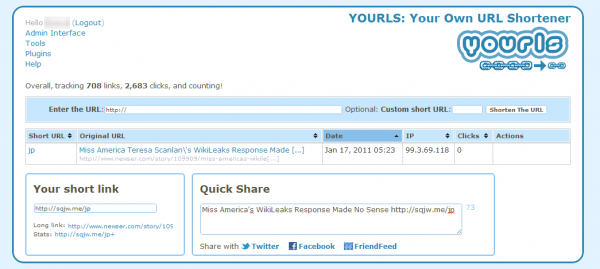
You can also customize your short link. For instance I created a short link (http://sqjw.me/web) to use on my Twitter profile and track how many people click from my Twitter profile to my website. You can create a customer short URL for each of the sites that you link to your website to determine which site drives the most traffic. From the YOURLS admin interface you can also share your links to Facebook and Twitter.
Once you have shortened and shared your link you can then see how much traffic and from where the clicks came from. The reports include geographic as well as time period statistics. Direct and referrer clicks are also tracked.

There is even a WordPress plugin that will automatically create the short URL when you publish a page or post. The only downside I’ve encountered is that the plugin can create multiple links for the same page or post. Luckily there is a support forum where you can log your bug and I hope the developer fixes this bug soon so I can take advantage of the integration.
Overall I really like how YOURLS gives greater control over short links and accompanying data. The creative marketer in me loves the branding aspect. Try it on your blog or website and let me know what you think.