Posts Tagged ‘design’

Mobile Site, App or Both?

No Comments » Written on October 28th, 2011 by
Categories: Digital Media, Marketing, Mobile, Strategy

Do you need a mobile site, smartphone app or both?With mobile usage and traffic growing by huge numbers recently there is a rush to create mobile friendly versions of your website.  But it does not end there, what about a iPhone or iPad app?  What about other smartphones: Droid, Blackberry, etc? Just thinking about it can make your head spin!

I’ve had many discussions with my peers and others about what the best choice is and always come back to the same answer.  It’s contingent on your customers both current and present.  Here are the questions I find myself asking those seeking advice on mobile marketing.

  1. Should you have a mobile website? The answer to this one is easy, yes! At the very least having a mobile site gives your brand a presence that can be viewed on mobile devices. With the continued growth of smarthphones and our demand for information, having a mobile website just makes sense.  What you should do with your mobile site plan is determine what information is necessary to have on it.  You don’t need everything your main website has.  Two key items I find are a must are easy to find contact information including your phone number and your location addresses so people can call and find you on the road.
  2. Does your company or brand need an iPhone app? An app is different from a mobile website in that it does more.  An app should have some functionality that mobile users need and provide value for mobile users.  Creating an app because everyone else is doing it is a waste of money.  Plus people will download it, use it once that’s it.  Do some creative brainstorming around your product and service and ask what simple tasks would I use on a smartphone.
  3. What about an iPad app? If your website is good then it can be viewed in Safari or Opera browsers on an iPad and you don’t need an app.  But if you can come up with creative uses mentioned in the previous point above, then maybe you have the basis for creating an iPad app.
  4. Should you design for Apple iPhone, Droid or Blackberry? The answer to this question depends on your customers.  Are they iPhone or Droid users? Or even the last of the BlackBerry die hards?  Google Analytics has a Mobile report that shows how many visitors are viewing your site and the device they are using.  Another way to find out is put a survey on your website or create an email campaign and ask them.
As with any interactive project flesh out what your requirements are after brainstorming.  Don’t just tell your agency you want a mobile app or site, tell them why it’s important to your business.  They will appreciate it and most likely you’ll get a better end product.  Also if you’re seeking proposals from several vendors a good requirements doc makes it much easier to get accurate price quotes and a finished product that makes you and your customers happy!

Will Brand Redesign Bring Back Budweiser’s Customers?

4 comments Written on September 14th, 2011 by
Categories: Marketing, Strategy

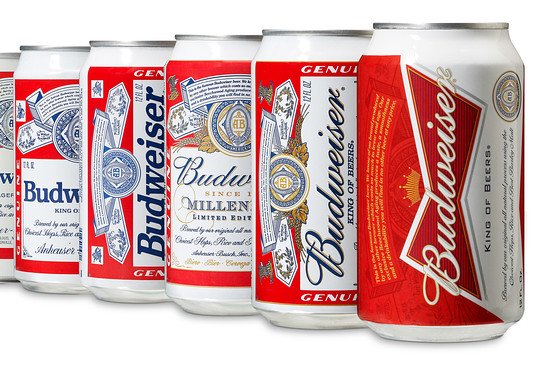
New Budweiser design and several can redesignsBudweiser announced that it is redesigning its cans. The bow tie Budweiser logo will be emphasized along with the red color. I wonder if this will attract new customers?  Sure there will be interest when the new design is seen on cans and swag, but will it last?

Overall the beer market has shrunk the past year.  People have stayed home and drank less during the recession.  Budweiser is now owned by InBev a Belgium brewer. U.S.-based sales for Budweiser dropped 7.3% in 2010, while sales for Bud Light dropped 2%, according to Beer Marketer’s Insights.

Still Bud and Bud Light are the top two beers sold in the US. A can redesign changes the packaging but how does it fit into Budweiser’s overall marketing strategy?

Bud has built the brand with aggressive advertising and promotion at national and local levels. NFL and other major sport ads provided the air cover that kept the brand fresh cool and present in consumers minds. From the talking frogs to the Wassup? guys, Bud has spent more than any other advertisers on the most expensive advertising event, the SuperBowl.

At the local level Bud has partnered with leading distributors and provided co-op dollars to sponsor local events and venues. By working with local bars and restaurants Bud and Bud Light have pushed special pricing to win sales based on price. Even the local delivery trucks have Bud splashed across the vehicle. A new brand requires some time to gel with fans while a throwback one could lead to immediate acceptance and appreciation.

Will the new design just give short term buzz and excitement about the brand yet long term sales will continue to decline? Bud has a long heritage that it could reach into. Bringing back Bud Man or some of the traditional designs could give it a more authentic nostalgic connection with consumers.  A retro design could tie in to digital media as it would allow for customers and fans to share in their memories and what they love the brand’s heritage.  Similar to how we’ve caught up with all our old high school friends on Facebook. I don’t think consumers will talk online much about the new can.

I think part of Budweiser’s redesign strategy is to attract younger customers in their 20s and 30s.  Yet the younger beer drinking public may see right through Bud’s gimmick and stick with their hipster brands like PBR or be craft beer connoisseurs. Is this Bud for you or for the rapidly changing younger generations?

WordPress vs. Joomla vs. Drupal Infographic

4 comments Written on August 26th, 2011 by
Categories: Infographics, Marketing

With the choices in open source content management systems (CMS) this infographic from Devious Media compares WordPress, Joomla and Drupal. I’ve used WordPress and Joomla to build sites and found both of them robust with many features available. WordPress I favor for its greater ease of use and wealth of plugins and available knowledge base on the web. I’ve only dipped my toe very reluctantly into Drupal and found it to be more complex than I’m willing to invest. It seems to be a strong platform for ecommerce as well as custom applications. If you choose Drupal you want to get a professional. Even entering data into the system seems a bit spooky to me. Joomla has a flexible framework but I found the plugins to be cumbersome and not perform as well as expected. Some of the Joomla sites I built a few years ago have been migrated to WordPress. Overall as you can probably tell I’m a big WordPress fan.

Open source CMS platform comparison
Source: Devious Media

Typography: The Message Conveyed by Printed Characters

3 comments Written on November 18th, 2010 by
Categories: Digital Media, Strategy

TypographyYour choice of font paints a picture with words, effectively conveying whether your message is playful or formal, sophisticated or aimed at children. Fonts can be used to emphasize the most important parts of an advertisement or article, especially for online readers who tend to quickly scan instead of carefully read. The type of font used is just as important as the colors or background in setting the mood of a message. So with this in mind, here are some points to take into consideration when choosing fonts and how they impact upon your readers’ opinion.

1. Use Styling to Denote Importance

Font size and thickness can be manipulated with any font to divide a message into parts of varying importance. Messages or advertisements often contain one most important element. Using a large, bold font for this element, whether it is the name of a company or an important date, makes that element stand out easily. The bolder and blockier the font, the more the words will jump out at the reader. Car dealerships or furniture stores often make use of large blocky fonts to announce a special sale.

Fonts such as Swiss and Futura are ideal choices when simple, chunky fonts are needed. These fonts have no serifs, which are the wispy extensions of the bottom and top of letters found in common fonts for newspaper or magazine text. Swiss and Futura come in varying thicknesses, from light to extra black, and condensed versions are also options when space is an issue. Many advertisements end with a small disclaimer at the bottom. This should always be the smallest font size of the ad and the thinnest version of the font. In articles, copyright lines or credits would follow the same format as a disclaimer.

2. More Formal Messages Require a More Stylized Font

Script fonts such as Edwardian or Zapfino come into play here. The elegant, swooping characters extend sometimes from thick at certain points to thin at the ends, like a willow branch reaching in the wind. Ideal for businesses such as wedding planners and five-star hotels, script fonts really convey a high-class image.

In addition to script fonts, formal messages sometimes use fonts that are simpler yet highly stylized. Examples are Camelia and Bernard Fashion, which are thin, rounded fonts. Their unique look draws the good kind of attention and states that the company is fashionable. These fonts should not be used for advertisements having a lot of text, because the words will easily get lost.

Only use script or stylized fonts when the message is simple, or just use them for the major headline or company name, and use a simple font for the rest.

3. Use Different Styling of Same Font for Easy Reading

Breaking up text with different styles of the same font makes for easier reading. The first, most important line should be bold. If there is a subheading underneath that, it could be italicized. Then, the main body should be regular text, which is called “Roman” or “Book.” If there is contact information or a company name at the end, it should be bold.

Setting up an advertisement or message in this way gives the brain an easy framework to understand and shows the chain of importance from greatest to least at a glance.

4. Use Special Display Fonts for Certain Holidays

Fonts to use for Halloween include Sand and Quake, which are squiggly, spooky typefaces, and Metropolitaines, which varies from very thick in the middle of a character to thinner and rounded outward toward the end. For Thanksgiving, Victorian and Harrington are good choices, because they have an old-fashioned yet domestic feel. For Christmas, the Snowcap font caps the top of each letter with a mound of snow. Graphic fonts such as Zapf Dingbats replace letters with images of shapes, including different types of snowflakes, which are handy to use in Christmas advertisements.

5. Italicized Fonts are Often Associated with Solemnity

Announcements such as thank-you messages for generosity of friends at a time of loss of a loved one should stick to italicized or light script fonts. Super-fancy script should not be used because the words will be hard to read. A script that has simple extensions at the tips of letters and maybe a strategically placed curl is good. Italicized versions of serif fonts like Garamond or Goudy work well, because they are easy to read yet fancier than a simple block font. Display fonts should be avoided, because they convey a more informal, happy tone.

Fonts work with all parts of an advertisement, article, or webpage to convey a solid, clear message. Elements can be manipulated to better cooperate. Background color can be altered to complement or contrast text color, or vice versa. As long as both color or shade and typeface set the same mood, the image will be enhanced by the complement. Typography does with characters what a painter does with brushstrokes. The result of both is an image that can be discerned as having a distinct mood. Proper use of fonts is key in painting the right picture.

This post was contributed by James who writes about design on the CreativeCloud. Click here if you would like to read more of his writing.

Aggregators Offer Quick Start Mashup Pages

3 comments Written on July 31st, 2009 by
Categories: Marketing, Social Media, Strategy

I’ve been doing some testing of RSS aggregator and mashup tools to develop requirements for a marketing portal project. These tools are great for non developers and marketing geeks like me to build a slick set of pages that can pull in multiple RSS feeds and other site content from both social media sites and standard HTML web pages.

I created demo pages on using both Netvibes and Pageflakes.

Both of the sites allow you to create free accounts and verify via email address. Once you verify the account you are ready to start building your portal pages.

Depending on the amount of content you are linking to, you may want to create multiple pages. This is done thru the use of tabs that are horizontally aligned at the top of the page. Tabs can be customized along with the header area with pre-built templates or you can create your own. I did find it difficult sometimes to make some graphic changes stick to the headers. Therefore I recommend that you do a quick site map to determine how much information you will be working with.

To create your first page select the content or “flakes” as Pageflakes terms them and select from a multitude of social networks, pre-built searches and RSS feeds. The tools also allow you to enter RSS feeds directly by entering the site or RSS URL. You can search by keyword and browse by category to find leading social network sites like Twitter, Facebook and YouTube. You can also create an embedded view of your corporate web site page by creating a flake that shows a fixed width view of any web page.

Based on my testing and development I found that you should have no more than a dozen flakes on a page. This is where the grouping helps with the tabs. You can have 50+ possible sites to pull content from but ideally you should be able to carve this into groups of:

  • A welcome page with links to 10 pages with additional information and the main news feeds.
  • A blogs page with 10 blog feeds
  • A Twitter page with 10 Twitter user RSS feeds and or keyword search results
  • A photo and video page with links to 10 user accounts, keyword search, tags or other criteria to Flickr, Picasa, Slide, YouTube and other sites.
  • A page with links or feeds from 10 sites that are grouped by subject matter or target markets.

Pages can then be set to Public view that will then allow you to share with your audience. I’m still in the final development of my pages so some of them are public viewed so coworkers can view without having to login to my account but have not been promoted otherwise.

I plan to release these page soon but they are still in development. To demonstrate a simple page that aggregates some of my social media information I built a demo page at http://www.netvibes.com/bmcd67.

Have you found any good mashup tools or examples?

Creating a Buzz on a Budget

1 Comment » Written on July 30th, 2009 by
Categories: Events, Marketing, Strategy

Today was the first full day at the Assoc of Chamber of Commerce Executives (ACCE) Convention at the Raleigh Convention Center. I was able to attend some great presentations on communication planning and social media that I’m going to write on in posts next week. I found that doing a tradeshow throws a kink in my challenge for a few reasons. First I was using my laptop to take notes on the speakers. After the morning sessions, the exhibits opened and I had to use my laptop to run the demo on the large monitor in our booth. Also between networking, demoing and returning calls I did not find the time to really sit down and write.

However I was able to see the reaction to my show giveaway and a clever promotion that I pulled together for Site Dynamics at ACCE. I had a small budget of under $400 to work with but needed to get a quantity of 1,000 items to put in the attendees show bags (approx 750) with some left over to giveaway at the booth. After searching the web for swag ideas I suddenly thought of doing a guitar pick with logo, web site and some slogan. I found out that it fit my budget and knew that it would be unique.

So I designed the pick below using an online tool that allowed me to upload my artwork and type set my slogan. I had a few days to get it done during the week of July 4th and have it shipped to the fulfillment house. There were a few glitches including shipping getting lost for a day but I got them there in time to be included in the show packages.

Now I know many exhibitors put a flyer to postcard or may a coupon or brochure but today I was assured by many booth visitors that the guitar pick was unusual and different in a good way. Many people commented that they either played or someone they knew played. But most important they remembered our name, stopped by the booth and saw a demo and entered into our giveaway drawing.

So I have a small 10 by 10 foot booth, table top display and demo station. Not very exciting so in order to tie in the pick I created a tabletop display showing our giveaway as the new Beatles Rockband video game. I also connected my iPod to the demo monitor that has speakers and cranked up Beatles tunes. Needless to say it worked. From a creative standpoint I was really happy since I met the challenge of budget and created a buzz in the space of the show that had results. I also used Twitter to promote using the conference hash tag #acce.

Marketing Toolkit v0.5 Desktop Publishing

1 Comment » Written on July 23rd, 2009 by
Categories: Marketing, Strategy

Writing about Web 2.0 technology over the past several months I am reminded of what the “new” technology was when I began my career and how it impacts us today. I graduated college in 1990 with a degree in communication and public relations. When I started college was already using computers for word processing and some basic programming. The computer at that time was a good tool but there wasn’t anything really cool until the Apple Macintosh came along with the first generation of PC based desktop publishing tools.

I purchased my first computer, a used Apple Mac for a whopping $2,500 and it was used and two years old! But hey it allowed me to start a career in desktop publishing which is what I did for the next few years. I spent most of my time learning about design and layout, pre-press technology and interfacing with various service providers and printers to deliver a finished, printed product. The various deliverables were newsletters, sales collateral, direct mail pieces, promos, stickers, giveaways, booklets, if you could put a logo on it I did that for my company using a Mac II and what is now called the Adobe Creative Suite. The only change is that PageMaker is now InDesign but the basic tools of Photoshop and Illustrator are still there.

The influence of desktop publishing was that it was a major shift in how companies and organizations developed and created their marketing communications. Prior to desktop publishing, producing communication involved more people to create and produce the image, especially for the commercial printers who employed two to three people for the job I was now doing on my computer. Also the marketing department had greater control of the finished product look and feel as well as the production schedule. We still had to get it to the printers at a certain time to get it printed but the time spent revising drafts was greatly reduced. Overall our cost per printed piece was reduced as we spent less money outsourcing production tasks to a printer, agency or pre-press specialist.

Now I must state that my experiences are more from the smaller company marketing department perspective. For most of my career I’ve worked in a department of three to five people and many times I’ve served as the entire marketing department, including now. I’ve done stints at agencies where I’ve been the outsourced resource for a large, multi-national company as well and had to justify my value if the client had a resource in house with similar skill set as mine. Most times it was dependent on time and not skill constraints.

With the growth of web sites and now social media technology what place does desktop publishing hold in today’s marketing? Why are we still producing printed collateral and business cards and other physical communication pieces? Well the answer is simple in that it’s part of the overall marketing mix and maintains the need for desktop publishing tools to produce collateral even if it’s a PDF download from the web site. The major shift is that the development of printed materials is less of a focus and priority for today’s marketing departments. We spend less money on printed materials and have better measurement on electronic communication that has a growing audience.

What influence did desktop publishing have on your career path and how much do you use it today?